Rate Limit
Currently, the Platform enforces a maximum API hits per hour rate limit. However, this limit alone is insufficient to prevent abusive behavior on the Platform. As a result, an attempt was made to adopt a thorough rate limit mechanism for REST 2.0 Endpoints. This strategic step intends to improve the Platform's overall security and stability by reducing potential misuse and providing a more seamless user experience.
Use Case
With Rate limiting, when a request is made to the /meta/applications endpoint, Platform follows a specific rate limit configuration process as outlined below:
Tenant-Level
-
Tenant administrators can create, edit, or delete rate limit profiles at the tenant level only if Enable Rate Limits is enabled in General Preferences by a Master Tenant. See Configuring Administrative Preferences, for more information. Support Administrators can assign profiles, which appear here as read-only.
For API requests to endpoints like /meta/applications, rate limits are checked in this order:
-
If a tenant-level profile exists, its limits apply on a per-configured interval basis.
-
If none of the above apply, system-level rate limits are used.
Tenants cannot change rate limit settings via UI or APIs; the backend rejects such attempts.
-
-
If an active window is found and the request limit is not exceeded, the request is processed promptly.
-
If there is no active window, a new window is activated, and the request is served while counting it towards this new window.
System-Level
-
If no rate limit profile is found at the tenant level for the
/meta/applicationsendpoint, the system looks for rate limit profiles configured at the system level. -
It checks if there is any profile configured with the provided endpoint.
-
If a suitable system-level profile is found, the rate limits specified in that profile are applied to the request.
This rate limit mechanism ensures that API requests to the /meta/applications endpoint are controlled and managed effectively.
Configuring Rate Limit
To access the Rate Limit Preferences page:
System Level
The system administrators can navigate to System Console > Control Panel > Configuration > Rate Limits.
The Rate Limits section should display the Rate Limit Profile Actions, Name, Description, Rate Limit, Interval type, date and time of the update, update initiated by etc.
-
Click Add Rate Limit Profile to add a new rate limit profile.
-
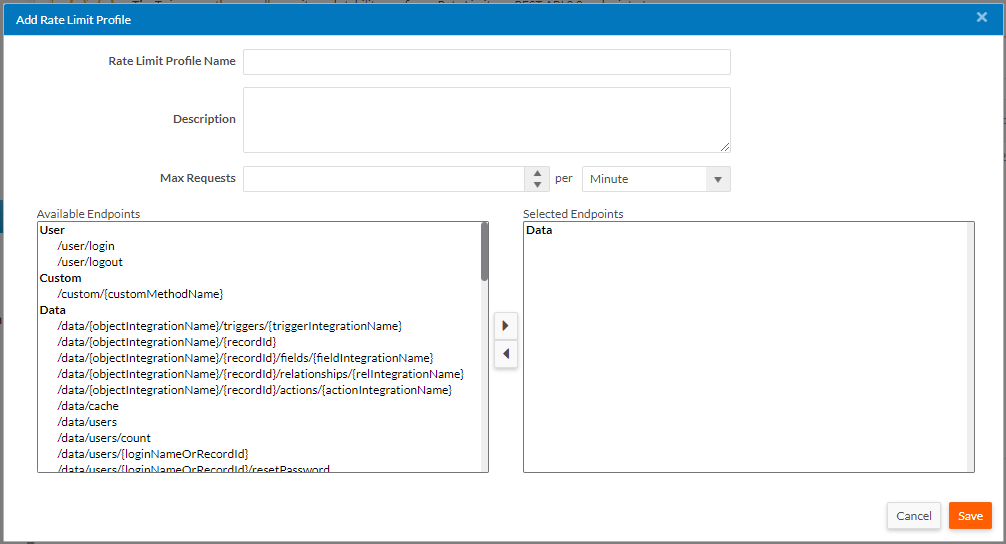
In the Add Rate Limit Profile screen, you can add the Rate Limit Profile Name, Description, Requests per minute, hour or day and select the preferred REST 2.0 API Endpoints from the available list.
-
Click Save to save the rate limit profile.
To edit or delete a Rate Limit Profile, click Edit or Delete.
Tenant Level
The tenant administrators can navigate to Setup Home > Administrative Setup > Rate Limits Settings to view assigned rate limit profiles. Tenants can access this section only if the shared property - RateLimitSettingsOverrideAtCustomer is enabled by the system administrator. Likewise, the property MaxRateLimitProfiles can be used for restricting customers to any specific number of rate limit profiles with default maximum value set to 20.
Similar to the system administrator configuration section, the Rate Limits section for tenants should display the Rate Limit Profile Actions, ID of the Rate Limit profile, Name, Description, Rate Limit, Interval type, Date and Time of the last update, Update initiated by etc.
-
Click New Rate Limit Profile to add a new rate limit profile.
-
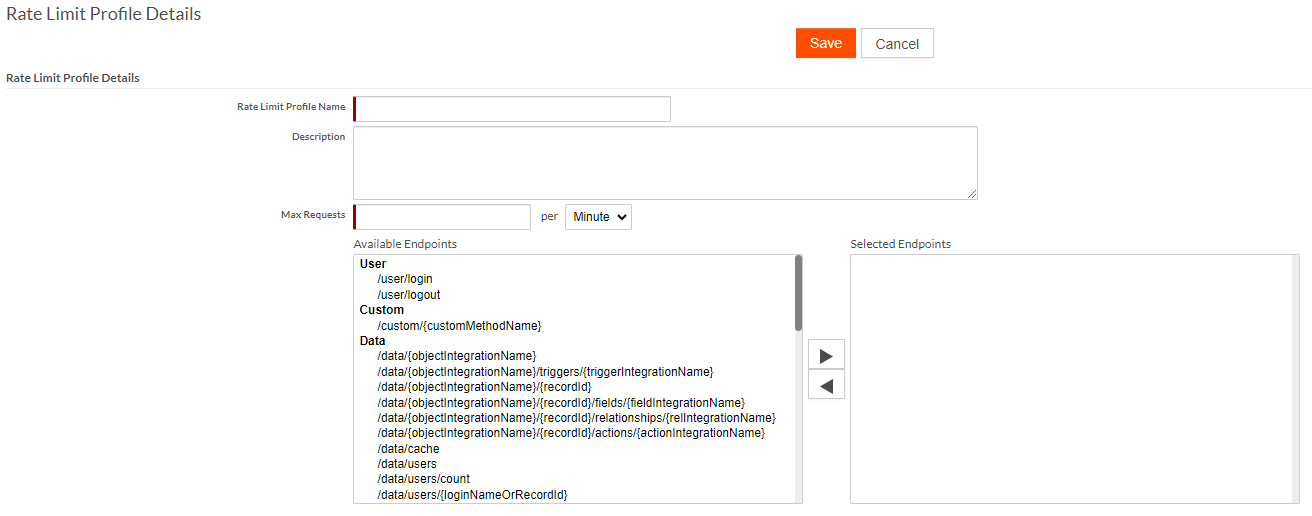
In the Rate Limit Profile Details screen, you can add the Rate Limit Profile Name, Description, Requests per minute, hour or day and select the preferred REST 2.0 API Endpoints from the available list.
-
Click Save to save the rate limit profile.
To edit or delete a Rate Limit Profile, click Edit or Delete.