Creating a Custom Method
Follow these steps to create a custom method:
- From the Setup Home page of your
application, select Custom Methods from the
ribbon.
Or From the Application Setup page of your application, select Custom Methods.
The page scrolls to the Custom Method section:
- Click New Custom Method.
The New Custom Method page opens:

- Enter the following information:
- Define Custom Method:
- Define HTTP methods:
Template Helper - Use the Template Helper and formula editor to create and validate the custom method.
HTTP Verb - Script to be executed when any of the HTTP verb (GET, POST, PUT or DELETE) call is initiated with the above mentioned endpoint.
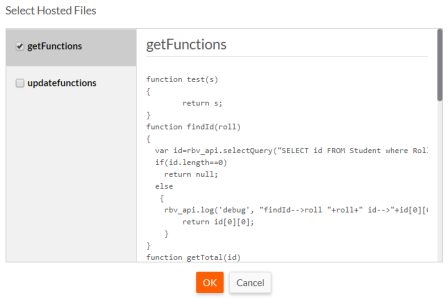
- Hosted Files - Provision to attach hosted files to a script (can be chosen for each HTTP verb). Hosted files can be used to combine javascript code that can be commonly used in different custom methods. These files are resolved as regular javascript files.
Click on the magnifier icon and select any Hosted File as shown in the following screen.
- Validate Formula : Click Validate Formula for quick validation of the formula's syntax. Note: Formula validation only checks JavaScript syntax validity.
- Log: Click to view the debug log file.
- Permissions: Configure which roles or individual users can invoke each HTTP verb (GET, POST, PUT, or DELETE). These permissions control access to the Custom Method endpoint; they do not restrict the operations performed by its script. Server-side API calls made by the script run in the Server API role context, which has all administrator permissions. If the method must enforce the initiating user's object-level permissions, add an explicit authorization check in the script before calling the API.
- Save: Click Save. The saved custom method appears in the Custom Methods page.